Transform Every Lead into a Conversation Without Expanding Your Workforce
The job of calling, messaging, and qualifying leads is automated by Olivia AI and converts your best leads to your sales team. Focus on closing while Olivia AI handles the conversation.

Simple 5-step roadmap
Transform Cold Leads to High-Intent Buyers
Upload Contact List
To re-engage inactive customers, upload a customer list to call without having to hand dial them.
AI-Powered Call Distribution
AI-sales automation Call Distribution provide a personalized experience for outbound calls.
Automation of Intelligent SMS
If the cold leads don’t respond, follow up with booking links via text message.
Transfer and Schedule live calls
Calls from hot leads can be scheduled directly in the calendar or sent to the sales team.
Real-time call analytics
Following each call, live call summaries, recordings, and transcripts are added to CRM.
Inside the Lead Experience
What Happens When Olivia AI Calls
A Call That Recognizes You
No standard script is used, nor is there any silence while someone reads your name. Olivia AI knows what the context is, so the telephone conversation starts as if it was picked up just after it was left off.
A Text When You Can’t Talk
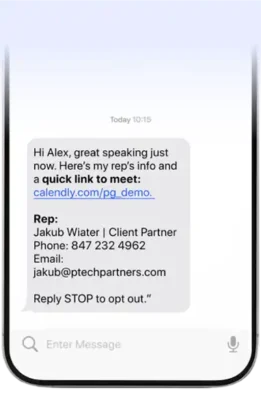
Couldn’t take the call? Olivia sends a text with a link to book a convenient time for a call again.
An AI Calling Agent That Knows Every Detail
When you are ready to take the conversation to the next level, you get transferred to someone in the team who already knows what was discussed.
Works with your stack
Olivia AI Fits into Your Workflow
There is no need for tedious data export, and manually inputting leads into the system has become a thing of the past due to Olivia AI’s capability of integration with your existing CRM.

Never miss an inbound call
How Olivia AI Handles Inbound Calls
Rebecca’s dashboard gives recruiters full visibility into interview progress, candidate scores, and funnel health, without juggling tools. Below you can see Rebecca’s dashboard views in action.
Step 1: Receiving Inbound Calls
Every incoming call is responded immediately. There is no waiting music, no answer phone, always available.


Step 2: Using AI to Communicate with the Caller
Olivia AI talks to the caller, responds to usual queries, and collects the information needed by your staff with a similar voice to your outbound calls.
Step 3: Find Out Intent & Qualification
Olivia AI understands the reason for the call and checks if it complies with your criteria.


Step 4: Routing the Call or Scheduling an Appointment
Olivia AI sends the caller straight to the right person, makes an appointment immediately, or records the call for later use.
Case study
Real Results From Real Teams
How Olivia AI Engaged 1,092 Calls and Delivered 35 Qualified Transfers for Home Inspection Company
2 days ago
How Olivia AI Engaged 9,478 Calls and Generated 160 Prospects
2 days ago
Before You Go, Want to see it work first?
Want to understand the process in depth? Skip the form and talk it through with our team.
Step-by-step Call setup
Set Up Your First Campaign in Under 2 Minutes
Olivia AI has simplified this process by making it possible for each of the members in your team to use just one tool to track each call in its sequence, including the stages of uploading files and making live phone calls.
Step 1: Upload Your Contact List
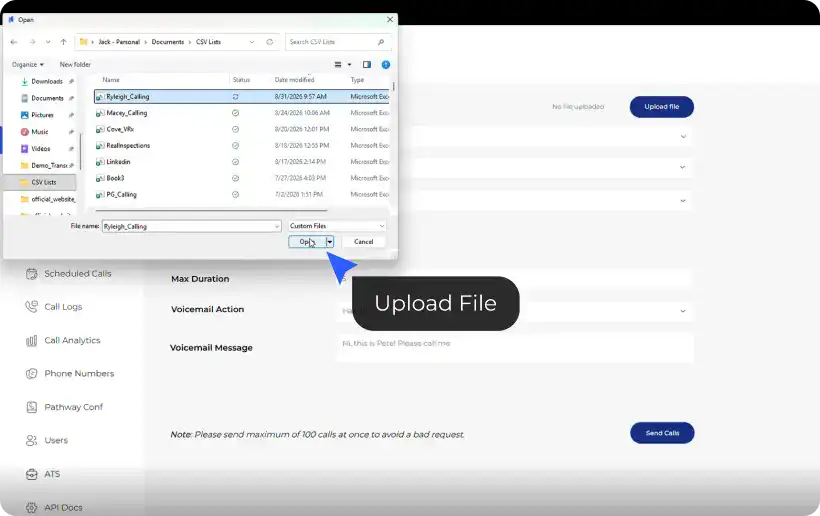
Click “Upload File” to choose your list in Excel or CSV format. If the wrong file was uploaded, remove it and re-upload the right one without starting over.
Step 2: Select Your Number & Voice
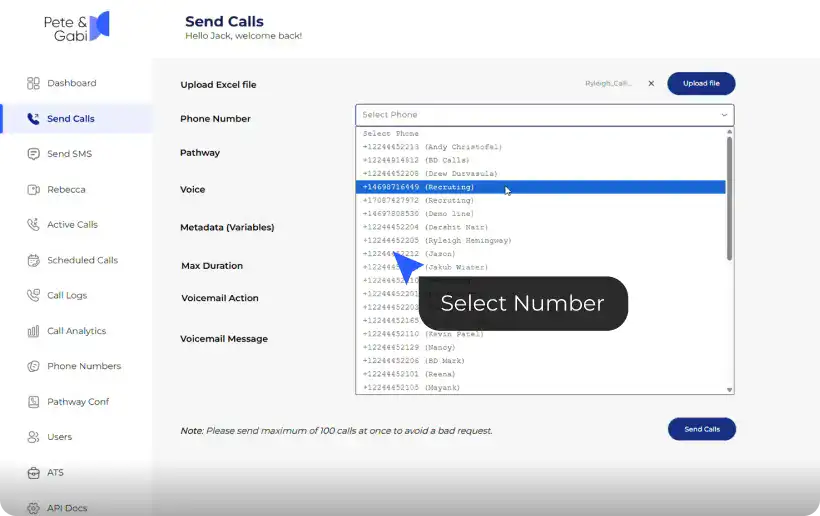
Pick the outbound calling number for the campaign and choose the AI voice or persona that works best with your style and audience.
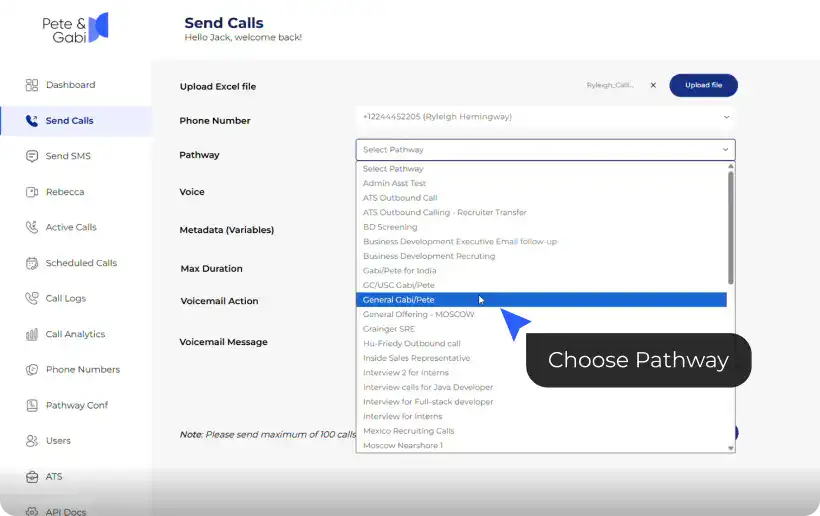
Step 3: Choose a Pathway & Set Your Variables
Choose the calling pathway for the campaign, either General, Acquisition, Win-back or a pathway designed by your team. Olivia AI will take care of mapping the columns from your spreadsheet to the requirements needed for your pathway, like agent name, lead name, etc. Consequently, every call will be personalized from the very first word.
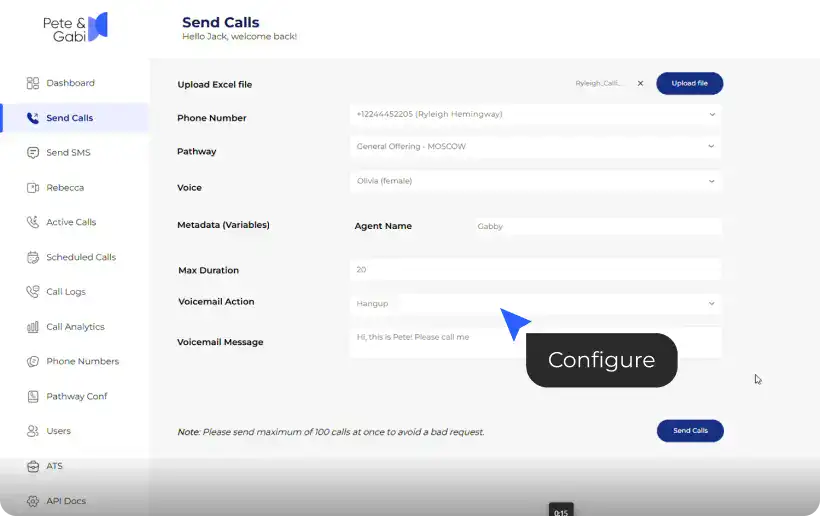
Step 4: Configure Call Settings
Configure on maximum call duration and what to do if lead does not answer – either disconnect the call or leave a voicemail message.
Step 5: Send & Confirm
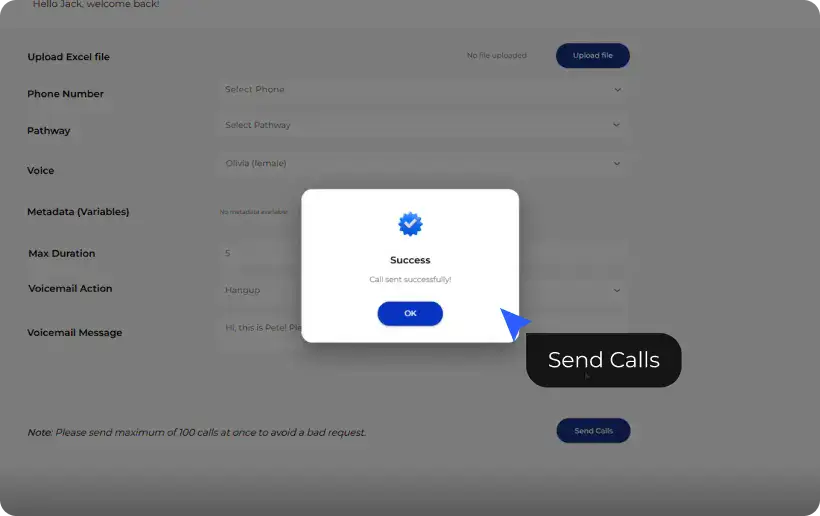
Hit “Send Calls” and see an immediate message confirming that your call will be dialed; you can monitor your call progress.