There is no modern talent acquisition without a dedicated digital infrastructure. With increasing applicant volumes and candidate expectations of quick, transparent communication, manual spreadsheets and disjointed email threads cause debilitating operational bottlenecks.
Modern recruitment software provides a structured digital foundation for finding, engaging, and hiring top talent. From building passive candidate pipelines to standardizing panel interviews and managing compliance, the right software stack helps hiring teams work efficiently while delivering a smooth applicant experience.
In this practical guide, we will define hiring software, explore the main categories of the recruitment stack, compare Applicant Tracking Systems and candidate relationship tools, explain common pricing models, and deliver key implementation steps for a smooth rollout.
What is recruitment software, and what problem does it actually solve for a hiring team?
Recruitment software is a specialized talent acquisition technology designed to automate, organize, and streamline the entire hiring process from beginning to end.
Instead of manual file folders and personal email boxes and disconnected calendar invites, these platforms provide a centralized digital command center for each and every requisition. They handle repetitive administrative tasks like posting jobs on multiple boards, tracking candidate status and collecting panel scorecards, freeing up human recruiters to spend more time building meaningful relationships with candidates.
| Operational Bottleneck | Practical Impact on Hiring Teams |
| Disorganized Pipelines | Centralizes applicant files, notes, and communications in one searchable database accessible to all reviewers. |
| High Administrative Drag | Eliminates hours spent manually copying candidate data, typing out scorecards, and managing email threads. |
| Inconsistent Evaluation | Standardizes interview questions and scoring rubrics so every applicant is assessed fairly on merits. |
| Compliance Liability | Captures required consent, logs audit trails, and supports EEOC/GDPR regulatory requirements automatically. |
Modern tools eliminate administrative friction, allow organizations to accelerate hiring cycles, reduce candidate drop-off, and make confident, data-backed hiring decisions.
What are the core categories of recruitment software (ATS, CRM, sourcing, screening, interview scheduling)?
To construct a high-performing hiring architecture, talent acquisition leaders must know that no tool does everything. Instead, today’s teams combine specialized tools from six core categories:
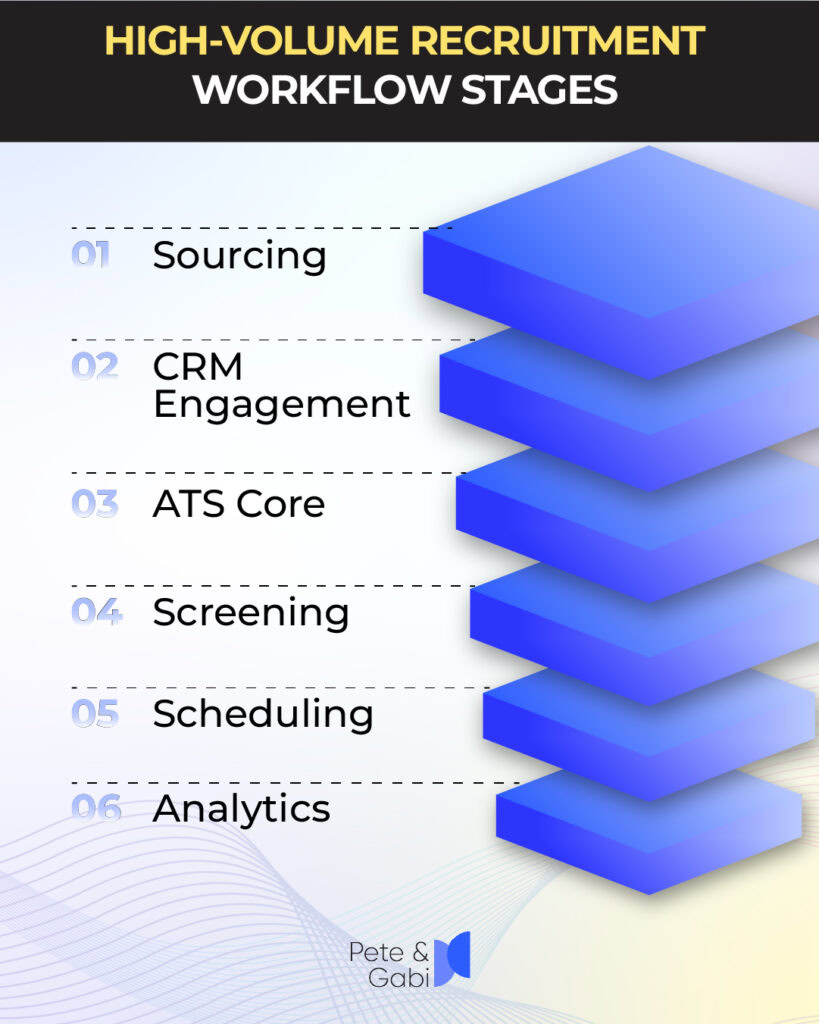
1. ATS (Applicant Tracking Systems)
The ATS is the central decision-making foundation of your active hiring pipeline. When a resume comes in, the ATS follows the applicant through each step, records interview notes, helps with job requisition sign-offs and handles the final offer letter processes.
2. Candidate Relationship Management (CRM) Software
An ATS deals with active applicants, while a candidate relationship manager is focused on passive talent outreach. It enables talent teams to build talent pools, nurture future candidates through email campaigns and engage with strong past applicants, well before a role is open.
3. Talent Discovery & Sourcing Tools
Sourcing tools leverage search engines and data enrichment to find qualified professionals across public channels, social networks, and specialized talent databases. They help recruiters find active talent that fits specific skill sets without waiting for inbound job applications.
4. Candidate Screening Instruments
Screening tools assess candidate fit early in the funnel. These include contextual resume parsers, technical coding platforms and asynchronous video assessments that help weed out the unqualified applicants before hiring managers conduct live interviews. For a deeper look into structuring early evaluations, see our guide on the candidate screening process.
5. Automated Scheduling Applications
Interview scheduling software syncs candidate preferences with team calendars (such as Google Workspace or Outlook). Candidates select open interview slots independently, eliminating the multi-day back-and-forth email cycle and sending automated SMS reminders to reduce no-shows.
6. Dashboards for Analytics and Reporting
Reporting tools pull together data from across your stack to measure pipeline velocity, candidate source effectiveness, offer acceptance rates, and team bandwidth, helping leaders continuously optimize their talent strategy.
What’s the difference between an ATS and a recruiting CRM?
The main difference between an ATS and a recruiting CRM is timing and pipeline focus: a CRM engages passive prospects before they apply, while an ATS manages active candidates after they submit an application.
Understanding where the friction is in your hiring process helps you decide where to invest in the platform layer first, Greenhouse’s Guide on Recruiting CRM vs. ATS says.
| Architectural Dimension | Candidate Relationship Manager (CRM) | Applicant Tracking System (ATS) |
| Pipeline Focus | Pre-application: Sourcing, talent pools, and passive candidate outreach | Post-application: Active stage tracking, interview rubrics, and offer extensions |
| Primary Audience | Passive prospects, silver-medalist past applicants, talent communities | Active job applicants actively moving through a hiring workflow |
| Core Objective | Generate candidate interest, nurture talent pipelines, and drive inbound demand | Structure candidate evaluation, maintain compliance, and facilitate hiring decisions |
| Key Metrics Tracked | Email open rates, campaign conversion, talent pool engagement | Stage conversion velocity, time-to-fill, offer acceptance rates, quality of hire |
When working well, a CRM will funnel qualified leads into your ATS as soon as they click “apply,” creating a seamless transition from passive prospect to active applicant.
What does recruitment software typically cost, and what pricing models are common?
The cost can be all over the place depending on the complexity of the platform, how many people you have at your company, how many candidates you have, and how feature-rich you want it to be. According to AltHire’s 2026 Software Pricing Report, modern hiring tech comes in three broad pricing brackets:
- Entry-Level & Budget Systems ($15 to $99/month): Standard ATS functions, posting to common job boards, and basic resume parsing for small businesses or startups making less than 10 hires per month.
- Mid-Range Platforms ($99 to $599 per month) : Full-featured screening workflows, video screening, automated scheduling and integrations across multiple systems for growing mid-market companies or staffing agencies that are hiring 10 to 50 people a month.
- Enterprise Full-Suites ($6,000 to $60,000+/year): Custom enterprise platforms with single sign-on (SSO), expanded audit logs, dedicated account managers, bespoke HRIS integrations, and granular compliance controls optimized for large-scale enterprise operations.
Standard Pricing Models Explained
Knowing how vendors calculate billing helps teams avoid surprise cost overruns:
- Per-Seat / Per-User Pricing: You pay a set monthly fee for each active recruiter or hiring manager seat. Heads up: This model gets pricey if you want every hiring manager or guest interviewer to have active platform access.
- Per-Active-Job Billing: You are billed for the number of open job requisitions you host at the same time, regardless of the number of team members who log in.
- Usage / Pay-Per-Hire Pricing: Pricing is based on total candidate volume or successful hires per month. See Rebecca AI Pricing Options for a clear look at usage-aligned pricing models.
Flat-rate enterprise subscriptions Unlimited user seats and job postings, up to a set annual candidate volume, packaged with SLA guarantees and dedicated support.
What should you check before switching or adding new recruitment software?
Replacing or upgrading your recruitment software stack is a major operational undertaking. Without a well thought out plan, teams run the risk of losing historical candidate data, interrupting active hiring, or facing low team adoption.
As described in Atlas Recruiting’s Analysis of ATS Migration Pitfalls, to avoid common rollout mistakes, you need to follow a structured pre-purchase checklist:
| Evaluation Criteria | Action Items to Verify Before Signing |
| Audit Existing Data Integrity | Clean up duplicate candidate profiles, outdated contact records, and unmapped tags before starting data migration. |
| Verify Bi-Directional Integrations | Confirm that the new tool connects natively to your existing HRIS, email servers, job boards, and calendars. |
| Map Custom Fields Carefully | Ensure custom scorecard categories, candidate notes, and stage history map accurately to avoid lost data. |
| Involve Daily Users Early | Include recruiters, hiring managers, and coordinators in software demos to evaluate usability and workflow fit. |
| Test in Staging Environment | Validate data transfer, notification triggers, and user permissions in a sandbox before going live in production. |
| Evaluation Criteria | Action Items to Verify Before Signing |
| Audit Existing Data Integrity | Clean up duplicate candidate profiles, outdated contact records, and unmapped tags before starting data migration. |
| Verify Bi-Directional Integrations | Confirm that the new tool connects natively to your existing HRIS, email servers, job boards, and calendars. |
| Map Custom Fields Carefully | Ensure custom scorecard categories, candidate notes, and stage history map accurately to avoid lost data. |
| Involve Daily Users Early | Include recruiters, hiring managers, and coordinators in software demos to evaluate usability and workflow fit. |
| Test in Staging Environment | Validate data transfer, notification triggers, and user permissions in a sandbox before going live in production. |
Taking time to perform a thorough data audit, map custom fields, and train hiring managers ensures a smooth transition without interrupting active candidate pipelines.
The Next Layer in the Recruitment Stack
Building an efficient recruitment tech stack takes putting the right layers in place, like using a CRM to grow talent pools, an ATS to keep a record of your decision making, and automated scheduling applications to align team calendars.
As the hiring workflows are evolving, intelligent conversational platforms, like Rebecca AI Recruiter, are becoming the newest layer in the modern software stack. AI platforms are the execution layer that automates preliminary screening and candidate interviewing, not a replacement for your core ATS. To learn more about how digital video screening fits into this framework, check out our breakdown of video interview software in modern hiring. You can also check out our entire suite of recruiting automation tools to learn how modern teams easily scale candidate capacity.